AeroSports
Scorecard (Next.js Realtime Display)
Realtime score display rendered in a secondary WebView, designed to show game state, scores, timers, lives, and mode-specific information with minimal latency and high readability.
Stack
Next.js + WebView
Runtime
Realtime JSON updates
Modes
Alliance + PvP + Custom
Deployment
Hosted centrally for all rooms
Role
Thin display layer
Tech Stack Overview
Grouped by the primary systems, languages, and infrastructure used in this build.
Frameworks
Next.js
Libraries
React
Languages
JavaScript, CSS
Supporting Systems
Backend, Kiosk Host
AeroSports
Scorecard (Next.js Realtime Display)
Realtime score display rendered in a secondary WebView, designed to show game state, scores, timers, lives, and mode-specific information with minimal latency and high readability.
Stack
Next.js + WebView
Runtime
Realtime JSON updates
Modes
Alliance + PvP + Custom
Deployment
Hosted centrally for all rooms
Role
Thin display layer
Tech Stack Overview
Grouped by the systems, languages, and supporting layers used in this project.
- Frameworks
- Next.js
- Libraries
- React
- Languages
- JavaScript, CSS
- Supporting Systems
Overview
The Scorecard is a Next.js project rendered as the second WebView inside the kiosk host application.
Its purpose is to give players a clear realtime view of:
- score
- lives
- timer
- active players
- level
- other game-specific information
The scorecard is intentionally designed as a lightweight dummy structure. It does not own game logic. Instead, it receives structured realtime data from the Kiosk Host, which itself receives the runtime state from the Game Engine.
This thin display architecture makes the scorecard:
- easy to update
- easy to adapt to different game modes
- more reliable for realtime synchronization
Architecture
The scorecard is a lightweight hosted display layer rendered inside the kiosk runtime. It receives structured realtime data from the kiosk host, which itself relays state from the game engine.
Workflow
When the Kiosk Host launches, the Alliance mode scorecard is loaded by default, except for custom games where the host can load a room-specific custom screen instead.
Step 1
Runtime flow
- The scorecard page is loaded inside the kiosk's secondary WebView
- The Kiosk Host determines the selected game type
- The host sends the required screen mode and initial/reset state to the scorecard
- During gameplay, the Game Engine sends realtime updates to the host through socket communication
- The host forwards structured JSON data to the scorecard
- The scorecard updates the screen in realtime
Typical realtime updates include:
- timer
- scores
- lives
- level
- player names
- progress data
- custom instructions / visuals
This keeps the scorecard focused only on rendering the current truth, rather than calculating state on its own.
Screen Types
The scorecard has three major display modes.
1. Alliance Mode
Used when players are playing together as a team.
Displays shared values such as:
- team score
- lives
- timer
- level
- game progress
2. Competitive Mode (PvP)
Used for player-vs-player gameplay.
In addition to common score data, it also displays:
- individual player names
- player-specific scoring
- clearer PvP comparison layout
This became important because showing generic labels like Player 1, Player 2 created confusion during live gameplay.
3. Custom Mode
Used for games that do not fit the standard scorecard structure.
This allows custom layouts for special game types, including:
- room-specific instructions
- custom visuals
- unique progress displays
The first major custom example was Recipe, where the page needed to display:
- recipe details
- instructions
- realtime game progress in a way that was informative but not overwhelming.
Interface Evolution
In the beginning, we only had Alliance mode game variants for the first two game rooms.
That meant one display structure was enough.
As the facility grew, the scorecard had to evolve.
Step 1 - Alliance only
- one shared scoreboard layout
- simple cooperative/team display
Step 2 - PvP support
Once competitive / PvP variants were introduced, we needed a different display model. We added: We also improved the UI multiple times so the infor...
Step 3 - Custom pages
When customformat games such as Recipe were introduced, the standard layout no longer worked. So we added: We also improved player clarity over tim...
Challenges
Although the scorecard is a relatively lightweight project, it was a very important part of the room experience.
1. Readability during fast gameplay
The first challenge was purely visual: Players should be able to glance at the scorecard and instantly understand it. Because the games often requi...
The first challenge was purely visual:
Players should be able to glance at the scorecard and instantly understand it.
Because the games often require:
- quick reactions
- movement
- physical agility
the display could not be something players had to "decode."
That meant:
- careful component placement
- readable sizing
- strong hierarchy
- avoiding visual overload
2. Synchronization issues in earlier versions
The scorecard was not always a pure dummy display. Earlier versions behaved more like an independent screen process and were updated through smalle...
3. Correct screen switching by game type
Another challenge was making sure the correct screen type was always shown. Sometimes, due to communication loss or data mismatch: This made the di...
4. Designing custom layouts without overwhelming players
The custom mode introduced a new challenge: we needed entirely different page formats for games that did not fit the standard scorecard model. For...
My Contribution
My contribution followed the same pattern as the other AeroSports software systems.
I helped build:
- the base structure of the scorecard
- the dummy display architecture
- the UI iterations that made the page easier to read in live gameplay
Once the dummy structure was in place, the scorecard became much easier to evolve because changes were mostly about:
- improving layout
- improving clarity
- handling new data requirements
I worked with my team on:
- the first custom page for Recipe
- UI improvements
- better support for different game types
- refining the structure so the scorecard could stay flexible without becoming unstable
I also trained team members on how the scorecard page worked and how it could be extended safely.
Tech Used
Core technologies
 Next.js
 React
React TypeScript
Supporting technologies
Related Projects
Other projects from the same platform and codebase.
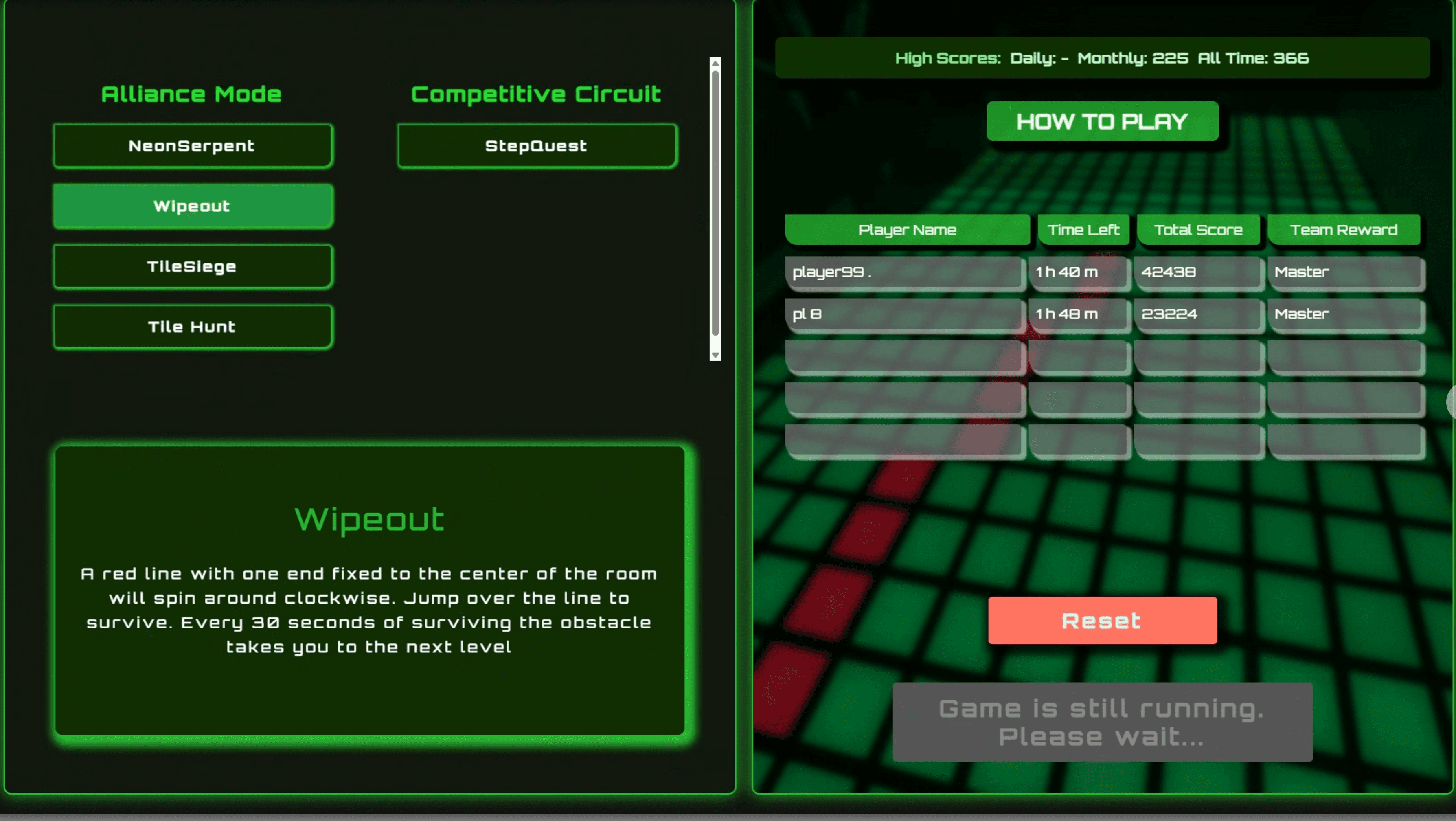
Kiosk UI (Next.js)

Customer and staff-facing kiosk UI for room readiness, player scans, variant selection, and session controls.


Kiosk Host & Room Control (.NET WebView)
WinForms orchestration layer between the Kiosk UI, Scorecard UI, Game Engine, backend API, and room hardware.

 WCPUS
WCPUS
Game Engine (.NET Console Runtime)
Realtime .NET runtime that launches game variants, manages controller communication, executes game logic, and coordinates restart flow with the kiosk system.
 SRE+1
SRE+1