AeroSports
Kiosk UI (Next.js)
Customer and staff-facing kiosk UI for room readiness, player scans, variant selection, and session controls.
Company
AeroSports
Role
Frontend lead inside the kiosk ecosystem
Stack
Next.js + WebView inside WinForms
Deployment
Server-hosted UI requested per room host
Status
Production flow used across active rooms
Tech Stack Overview
Grouped by the primary systems, languages, and infrastructure used in this build.
Frameworks
Next.js
Libraries
React
Languages
JavaScript, CSS
Supporting Systems
Backend, Kiosk Host
AeroSports
Kiosk UI (Next.js)
Customer and staff-facing kiosk UI for room readiness, player scans, variant selection, and session controls.
Company
AeroSports
Role
Frontend lead inside the kiosk ecosystem
Stack
Next.js + WebView inside WinForms
Deployment
Server-hosted UI requested per room host
Status
Production flow used across active rooms
Tech Stack Overview
Grouped by the systems, languages, and supporting layers used in this project.
- Frameworks
- Next.js
- Libraries
- React
- Languages
- JavaScript, CSS
- Supporting Systems
Provides the room-facing UI layer on top of the host and backend systems.
Overview
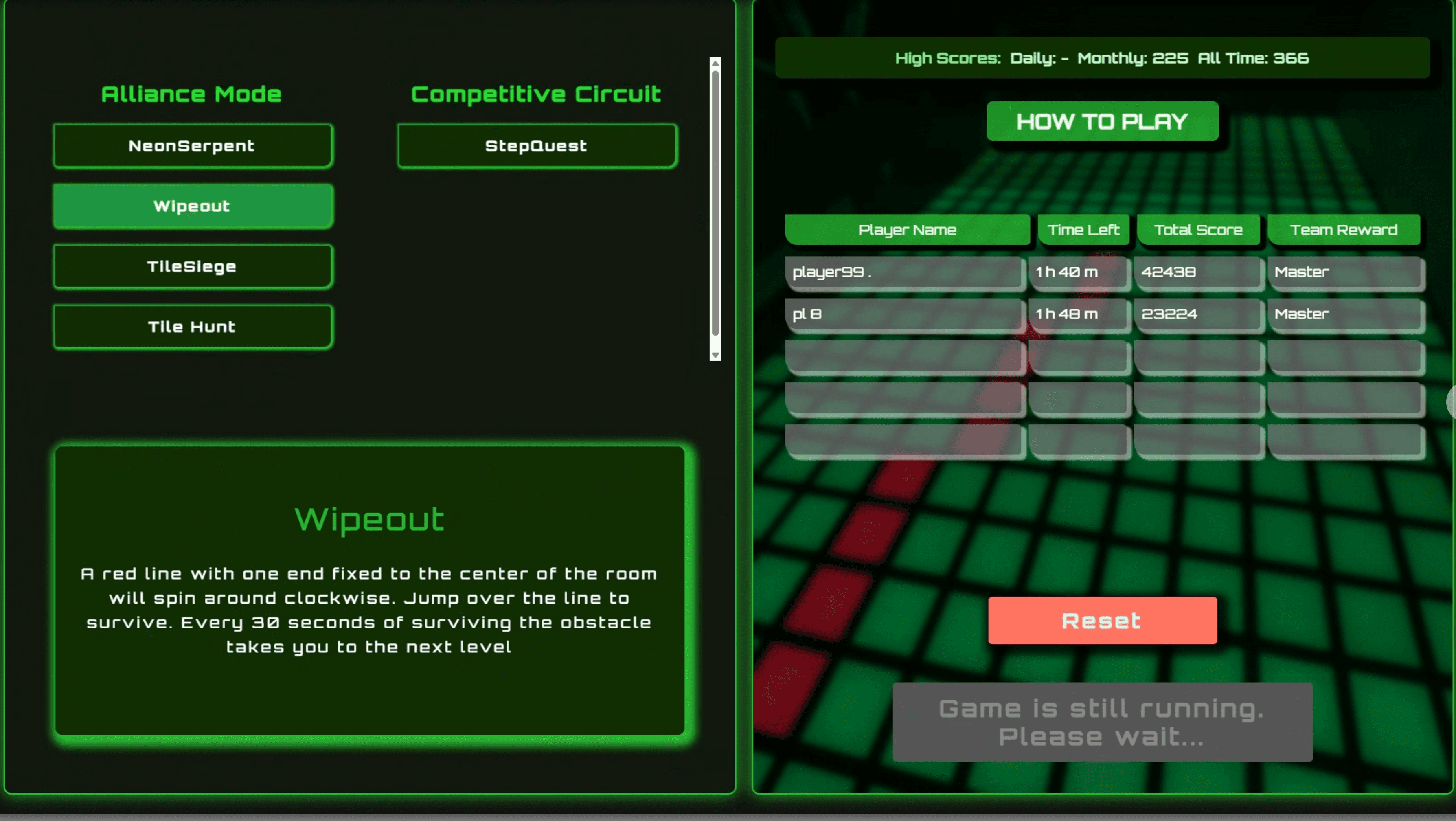
The Kiosk UI is the web-based frontend of the full kiosk system used in AeroSports game rooms.
It is built with Next.js and rendered inside the WinForms WebView host application. The UI is hosted centrally on the server, and each game host requests the page with its own room-specific parameters.
Its role is focused on the customer and staff interaction layer only. It does not directly control hardware, door locks, admin tools, or other device-level features. Those are handled by the Kiosk Host application.
The Kiosk UI is responsible for:
- showing game variants and room details
- handling player wristband scans
- guiding customers through the start flow
- showing game information and high scores
- sending session start instructions to the host app
- receiving room/game status updates from the host
Architecture
A focused view of the Kiosk UI boundary: database data flows into the UI, and the UI exchanges commands and status with the host.
The Kiosk UI communicates with two layers:
Kiosk Host (WinForms)
Sends to Host
- selected game variant
- scanned player information
- game type (single player, multiplayer, custom)
- any variant-specific session settings
- waiting state / session actions
Receives from Host
- current game status
- reset / refresh commands
- scanned NFC wristband IDs
- room-specific status or process information
Backend API (Express)
The UI reads:
- game room details
- available game variants
- variant descriptions
- player information
- high scores
It is a read-focused frontend and does not directly write data to the database.
Customer Flow
The main customer journey was designed to be simple and visually guided.
Step 1 - Explore variants
Customers see a list of game variants on the left side of the screen.
They can:
- select a variant
- read a short description
- open a separate How to Play dialog for more details
- view a themed background image for the selected variant
Step 2 - Scan players
Customers must scan at least 1 wristband, with a maximum of 5 players.
The number of scanned players affects:
- difficulty
- gameplay balance
- scorecard behavior for many rooms
Step 3 - Wait or start
After scanning:
- if the room is occupied, they must wait until it becomes available
- if the room is ready, they can start immediately
When the session starts:
- the UI triggers a 10-second countdown
- players enter the room
- the screen resets back to the initial state for the next group
The UI also sends a waiting status to the host so players already inside the room cannot immediately restart the same session from outside.
Interface Evolution
The UI went through multiple iterations and continues to evolve.
Earlier versions
- fully WinForms-based UI
- then migrated to Next.js inside WebView
- initially used a single-screen flow
- later evolved into a two-step process
- then improved further into a split-screen layout
Current split-screen layout
This made the interface easier to understand while keeping the main actions visible. The screen also displays:
Challenges
The main challenge was not backend complexity - it was making the interface as user-friendly and informative as possible.
We continuously took input from:
- staff
- customers
- real-world room usage
Key UX problems we had to solve included:
- long text descriptions were overwhelming for customers
- players needed a faster way to identify variants visually
- error messages needed to explain clearly what to do next
- the UI had to improve without introducing a steep learning curve for staff
Important improvements included:
- adding variant images so players could identify games faster
- moving detailed explanation into a separate How to Play dialog
- improving text formatting to reduce visual overload
- adding more informative process and error dialogs for cases like:
- expired wristband
- unregistered wristband
- room not ready
- players already inside the room
- keeping the overall layout consistent while making gradual UX improvements
The goal was to make the interface feel familiar, even as it continued evolving.
My Contribution
I was originally hired specifically to handle the frontend side of the kiosk system because I already had strong experience building web interfaces with Next.js.
From the beginning, I was the primary person responsible for the Kiosk UI design and implementation, and I led most of the ongoing improvements to the interface.
At the same time, the system improved through feedback from:
- team members
- staff using the rooms daily
- customers interacting with the flow
My role was to translate those inputs into practical UI changes while keeping the experience consistent and easy to use.
Why This Stack
Using Next.js inside WebView turned out to be the right architectural choice for several reasons:
- Better frontend flexibility than building everything directly in WinForms
- Easier to design a clean, modern, and highly customizable UI
- Centralized hosting on the server meant all game rooms could be updated at once
- Faster rollout of UI improvements without rebuilding each room individually
- A smoother path for continuous frontend iteration as the product evolved
This approach allowed the UI to improve rapidly while staying easy to deploy and maintain.
Impact
The Kiosk UI became a key part of making the room experience smoother for both players and staff.
It improved:
- clarity of game selection
- session readiness flow
- onboarding for first-time players
- consistency across game rooms
- speed of deploying UI updates across facilities
Tech Used
Core technologies
 Next.js
 TypeScript
 JavaScript
 Tailwind
Related Projects
Other projects from the same platform and codebase.
Kiosk Host & Room Control (.NET WebView)

WinForms orchestration layer between the Kiosk UI, Scorecard UI, Game Engine, backend API, and room hardware.

 WCPUS
WCPUS